Lead Capture App Buying Checklist for Event Organizers
Exhibitors invest a lot in showing up at your event. Between booth fees, travel, staffing, and sponsorships, they want more than a busy booth. They want qualified leads that turn into real business.
And when it’s time to decide whether to return next year, those results matter.
That’s why choosing the right lead capture app is about more than scanning badges. It’s about giving exhibitors the tools to collect better leads, follow up faster, and see the value of participating in your event.
But not every lead capture solution delivers the same experience. Some create extra work for your team, while others make it harder for exhibitors to access the information they need.
Use this checklist to compare lead capture apps, ask vendors the right questions, and find a solution that works for your exhibitors and your event team.
What Is an Event Lead Capture App and How Does It Work?
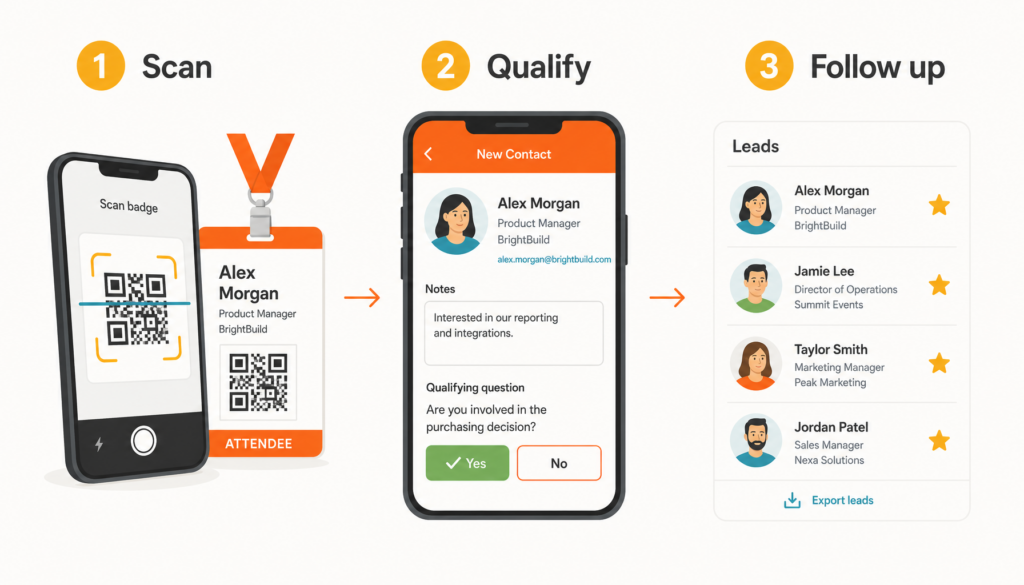
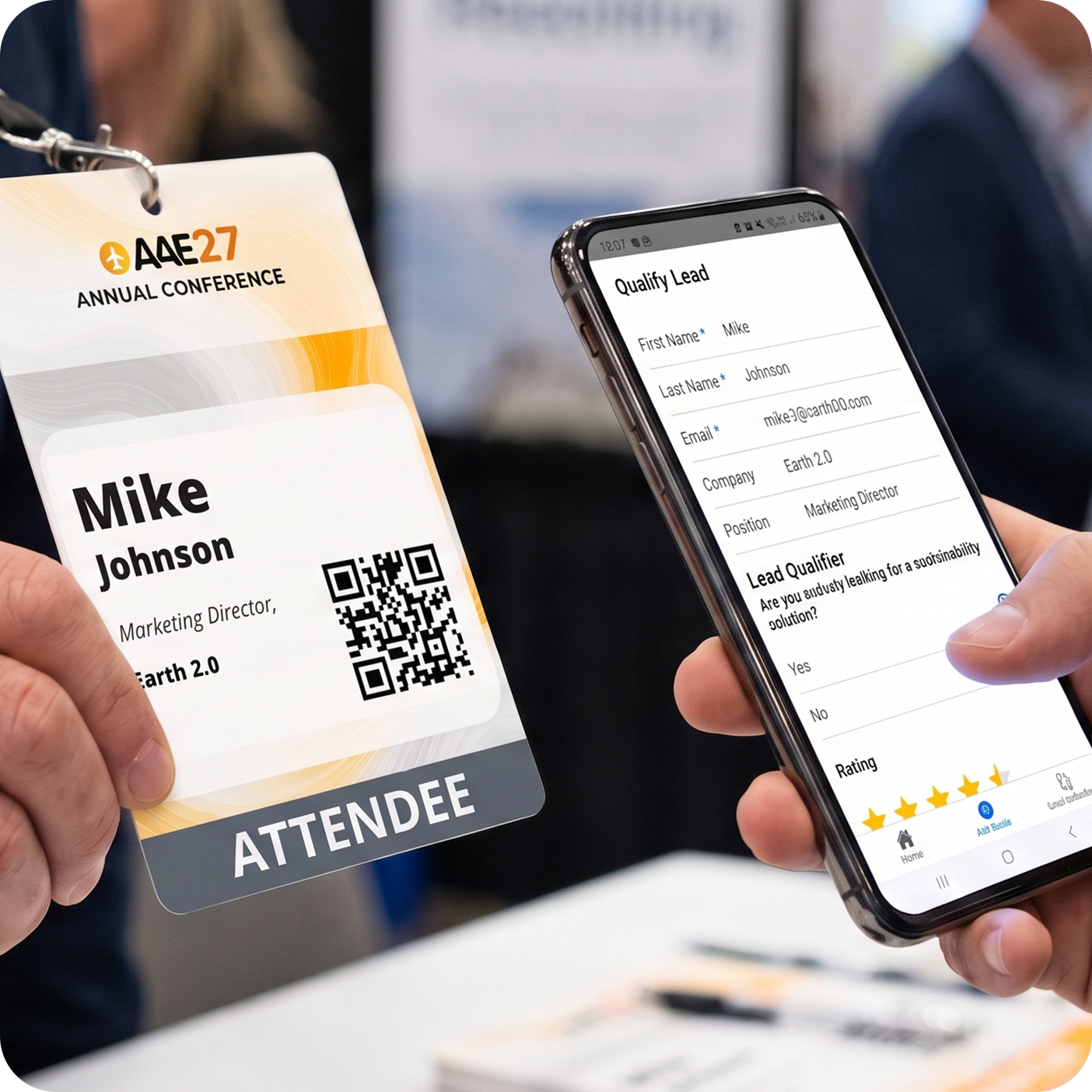
An event lead capture app allows exhibitors to scan attendee badges, collect contact information, and qualify prospects during in-person events. Booth staff can add notes and answer qualifying questions, giving sales teams the context they need to prioritize follow-up after the event.
Most mobile lead capture apps work on smartphones or tablets, although device compatibility and hardware requirements vary by provider. EventMobi’s Lead Capture app supports both iOS and Android devices, allowing exhibitors to scan badges without renting additional equipment.
How Can You Evaluate Lead Quality in a Lead Capture App?
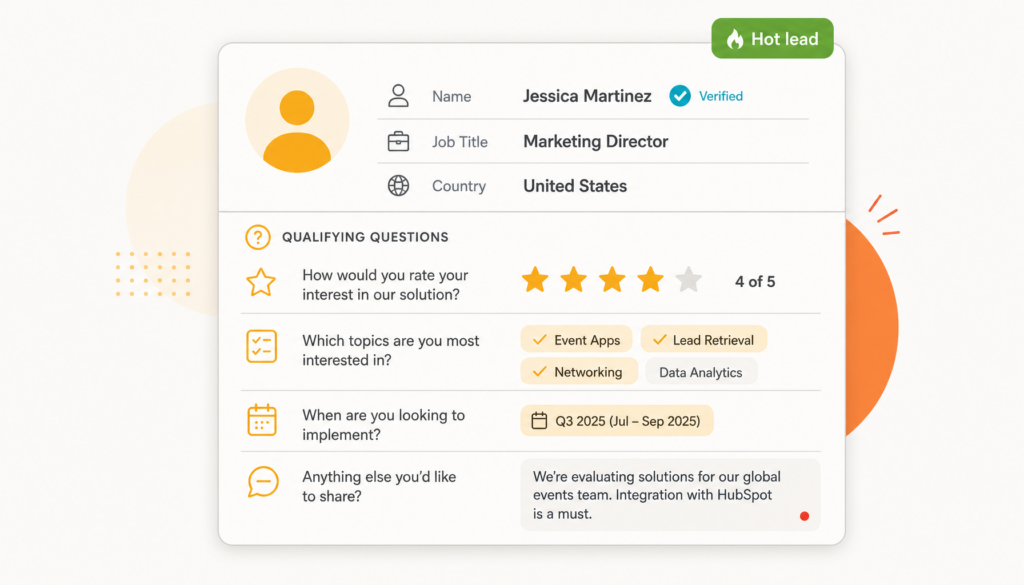
Scanning a badge is only the first step. Exhibitors also need accurate contact information and enough context from each conversation to know which prospects to prioritize.
When comparing lead capture apps, look for tools that make it easy to collect, qualify, and organize leads while conversations are still fresh.
| Question to ask | Why it matters | Watch for |
| Does the app read printed and digital badges? | Attendees carry both types, so booth staff need to scan both. | An app that reads only one format, which slows scanning at busy booths. |
| Can each exhibitor write its own qualifying questions, with no cap? | Qualifying questions show the sales team who is ready to buy. | A process that sends every question through the organizer, or a limit on how many questions an exhibitor can add. |
| Which answer types are supported? | Text, ratings, dates, and single or multi-select answers cover most sales needs. | Free-text answers only, which make the lead list hard to sort. |
| Can registration fields, such as job title and country, flow into the export? | Exhibitors get accurate data without asking attendees for it twice. | Answers that don’t name the exportable fields, or that change each time you ask. |
| Do lead records come from the attendee’s registration data? | Guessed or stale data stops follow-up before it starts. | Any app that fills gaps from outside databases the attendee never agreed to share. |
How Easy Is the Lead Capture App to Set Up and Manage?

The last thing your event team needs is another tool to troubleshoot on show day.
Exhibitors will have questions. Someone will need to add a last-minute booth rep, update a qualifying question, or figure out how to export their leads. The more exhibitors can manage themselves, the fewer last-minute requests your team has to handle.
When comparing lead capture apps, look for tools that give exhibitors control over their own setup without adding to your team’s workload.
| Question to ask | Why it matters | Watch for |
| Can exhibitors add reps and manage their own qualifiers? | Your team stays out of day-to-day booth management. | A process where every rep change or qualifier edit goes through you. |
| Do we decide which companies get access? | You control who receives a license and who sees the data. | Access that is open by default or that you can’t remove. |
| What onboarding comes with the app? | Exhibitors who can learn the app on their own don’t need your team to train them. | Onboarding that depends on training sessions for every exhibitor. |
| How far ahead does setup need to start? | Exhibitors need time to add reps and build qualifiers before the doors open. | Setup that begins only in the final week before the show. |
| Does the app require hardware rental? | Rented scanners add cost, and someone has to ship, track, and return every device. | Hardware rental for every booth, priced separately from the app. |
| How do exhibitors export leads and get them into their CRM? | Leads only pay off once they reach the exhibitor’s sales team. | Exports that run only through your team. |
How EventMobi simplifies exhibitor setup
With EventMobi’s Lead Capture app, exhibitors can manage booth staff and qualifying questions through the Company Portal. In-app walkthroughs and a setup guide help exhibitors get started without requiring individual training sessions.
Booth staff can scan badges using their own iOS or Android devices, eliminating the need to rent and distribute scanners.
EventMobi recommends completing setup 2 to 4 weeks before the event to allow time for license activation and exhibitor onboarding. After the show, exhibitors can export their leads as a CSV file and import them into their CRM.
What Should You Look for in Lead Capture App Pricing?
Lead capture can be more than an exhibitor benefit. Depending on the pricing model, it can also create an additional revenue opportunity for your event.
Some organizers include lead capture in sponsorship packages, while others offer it as a paid add-on. Either way, understanding how vendors structure their pricing will help you protect your margins and build packages that make sense for exhibitors.
Here’s what to ask before committing to a solution.
| Question to ask | Why it matters | Watch for |
| What is the pricing unit: per company, per rep, per device, or per scan? | Per-rep pricing means someone has to count reps at every booth, and that work grows with every show. | A unit that changes with booth size or leaves you unsure what you’ll owe. |
| What does one license cover? | The license scope decides what each exhibitor gets and how many you need to buy. | Licenses capped at a set number of scans or devices. |
| What do packs cost, and how many licenses come in each one? | You need the per-license cost to set your markup and build sponsor packages. | Pricing that’s only available after a sales call. |
| Can we tier packages by sponsor level? | Sponsor tiers are easier to sell when each level gets something clearly different. | Vendors that charge you more to unlock core features, such as custom qualifiers or exports. |
| Can we resell it, or bundle it into sponsorship packages? | You can sell it as an add-on or include it in every package. Bundling means every booth leaves with leads. | Resale restrictions or a separate contract for each exhibitor. |
| Who sets the price exhibitors pay? | Your markup decides whether lead capture earns revenue or only covers its cost. | Vendors that set the exhibitor price, which limits your margin. |
How EventMobi’s Lead Capture pricing works
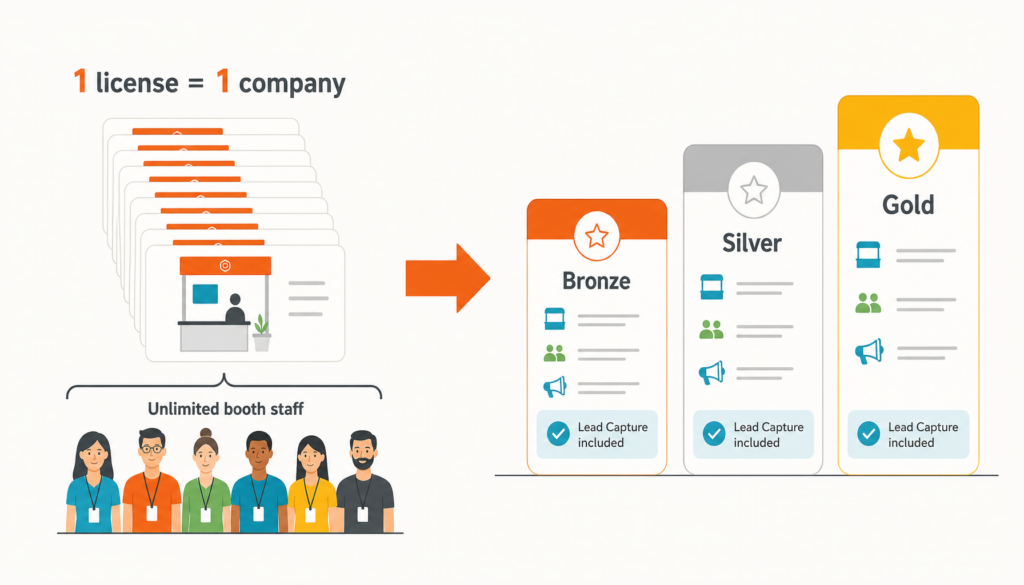
EventMobi offers Lead Capture in packs of 10 licenses for $500 USD. Each license covers one exhibiting company and includes unlimited booth staff, with no additional fees based on the number of representatives.
Organizers can resell licenses individually or bundle them into exhibitor and sponsorship packages. Since every license includes the same features, organizers can set their own pricing and decide how to package lead capture for their event.
For more on pricing, read How to Price and Resell Lead Capture to Your Exhibitors.
What’s the Difference Between Official Lead Capture and Third-Party Badge Scanners?
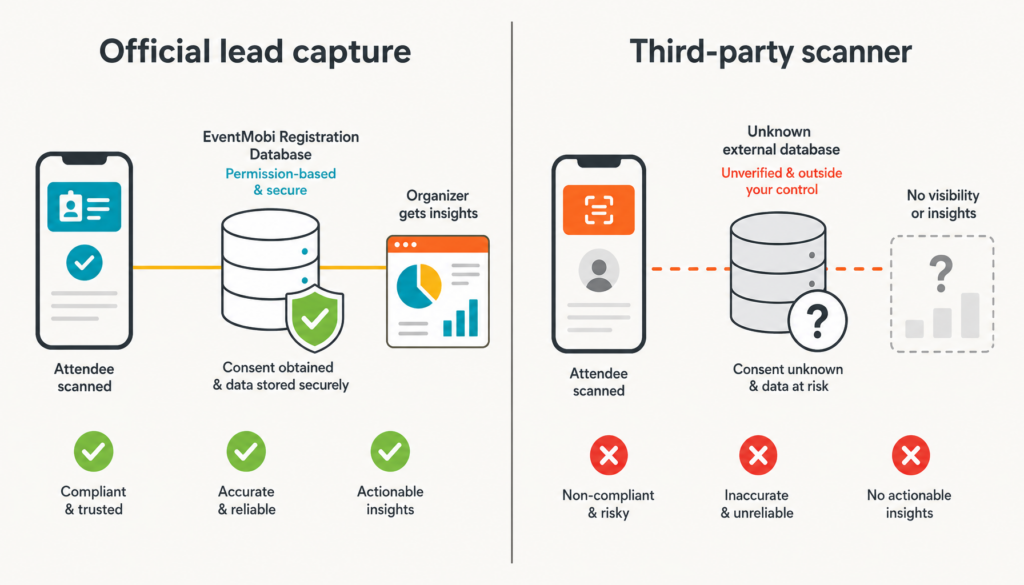
Some exhibitors prefer to use their own badge scanning tools, especially if they attend multiple events throughout the year. While these apps may offer familiar workflows or direct CRM integrations, they don’t always have access to the same attendee information as an event’s official lead capture solution.
Official lead capture apps typically connect to event registration data, giving exhibitors access to the information organizers have approved for sharing. Third-party scanners may rely on separate databases or integrations, making it important to understand where the data comes from and how it’s collected.
Before allowing outside scanning tools, organizers should review their data-sharing policies and confirm what information exhibitors can access.
| Feature | Official lead capture | Unofficial badge scanner |
| Access to event registration data | ✓ | Depends on integrations and data access |
| Attendees agreed to the data sharing | ✓ | Not guaranteed |
| Registration fields flow into exhibitor exports | ✓ | Varies |
| Organizer keeps control of attendee data | ✓ | ✗ |
| Organizer can show sponsors lead data at renewal | ✓ | ✗ |
| Native sync with the exhibitor’s CRM | CSV import | Varies, and often available |
Third-party scanners may work well for exhibitors who attend multiple events and rely on existing CRM workflows. However, organizers should understand the trade-offs in data access, reporting, and attendee privacy before approving them.
Read EventMobi’s comparison of official lead capture and standalone badge scanner apps for the full picture.
How Does Lead Capture Help Demonstrate Exhibitor ROI?

Getting attendees to visit exhibitor booths is one challenge. Helping exhibitors turn those conversations into valuable business opportunities is another.
At GO WEST, an annual industry trade show in Edmonton, Alberta, organizers use gamification challenges to encourage attendees to explore the show floor and connect with exhibitors.
As Arlene Schilke, Executive Producer of GO WEST, explains:

— Arlene Schilke, Executive Producer, GO WEST
But a busy booth doesn’t automatically translate into qualified leads. Exhibitors also need a quick, reliable way to capture attendee information, keep track of conversations, and follow up after the event.
For Jessi Toms of Alberta Fun Money Casino, an exhibitor at GO WEST 2025, EventMobi’s Lead Capture app helped simplify that process.

— Jessi Toms, Alberta Fun Money Casino
That experience matters long after the show floor closes. When exhibitors can easily organize their leads and follow up with prospects, they’re better equipped to evaluate the return on their investment.
For organizers, lead capture reports add another layer of evidence to exhibitor ROI conversations. Rather than relying on booth traffic and anecdotal feedback alone, organizers can use lead activity to help demonstrate the value of participating and support future sponsorship discussions.
What Should You Test During a Lead Capture App Demo?

A feature list can tell you what a lead capture app offers, but a live demo shows how it actually works.
Before choosing a vendor, ask to walk through the same tasks your exhibitors will complete before, during, and after the event.
- Scan a sample badge. Check what attendee information appears and how quickly the app captures it.
- Add a qualifying question. See how easily exhibitors can customize questions and record responses during conversations.
- Export a lead list. Review the exported data and confirm that it includes the information exhibitors need for follow-up.
- Add another booth representative. Test how exhibitors manage staff access without involving the organizer.
- Review the setup process. Ask what onboarding resources are available, how long implementation takes, and what support exhibitors receive.
The goal isn’t just to confirm that the app has the right features. It’s to understand how easily exhibitors can use them when the show floor gets busy.
Frequently Asked Questions
Ready to Test It on Your Show Floor?
The right lead capture app should make life easier for everyone involved. Exhibitors get the information they need to follow up with prospects, attendees spend less time answering repetitive questions, and organizers gain another way to demonstrate event value.
As you compare vendors, look beyond the feature list. Consider how the app will work on a busy show floor, how much support exhibitors will need, and whether the pricing makes sense for your event.
Use this checklist during your next vendor demo to find a solution that works for your team and your exhibitors.
Want to see how EventMobi’s Lead Capture app works?
Book a demo to explore the platform.
