How to Write a Call for Speakers That Gets Great Submissions
You open a call for speakers and get a pile of proposals that don’t fit: product pitches, off-theme talks, and abstracts with no takeaway. Bios are missing, formats don’t match, and a rush of submissions lands the night before the deadline.
Then the accepted proposals still need to be retyped into the program, field by field. Both problems have one fix: great submissions start with a clear brief and end with a clean handoff.
The brief shapes what comes in, and the handoff decides whether the work you collected survives the trip into the program. The template in this article gives you page copy, form fields, and a sample timeline to adapt, and the free Call for Speakers Kit adds a scoring rubric, decision email templates, and a speaker promo pack.
Here’s how to run a call for speakers, step by step:
- Define the audience, theme, and session formats.
- Write four to six selection criteria and publish them with the call.
- Build the call for speakers page with formats, time commitment, benefits, and key dates.
- Keep the application form short and map each field to your program.
- Open submissions for 6 to 8 weeks and send a reminder two weeks before closing.
- Score proposals against a rubric, keep a maybe list, and send decisions on the date you promised.
- Turn accepted proposals into speaker profiles and sessions, then collect the remaining assets.
What Is a Call for Speakers?
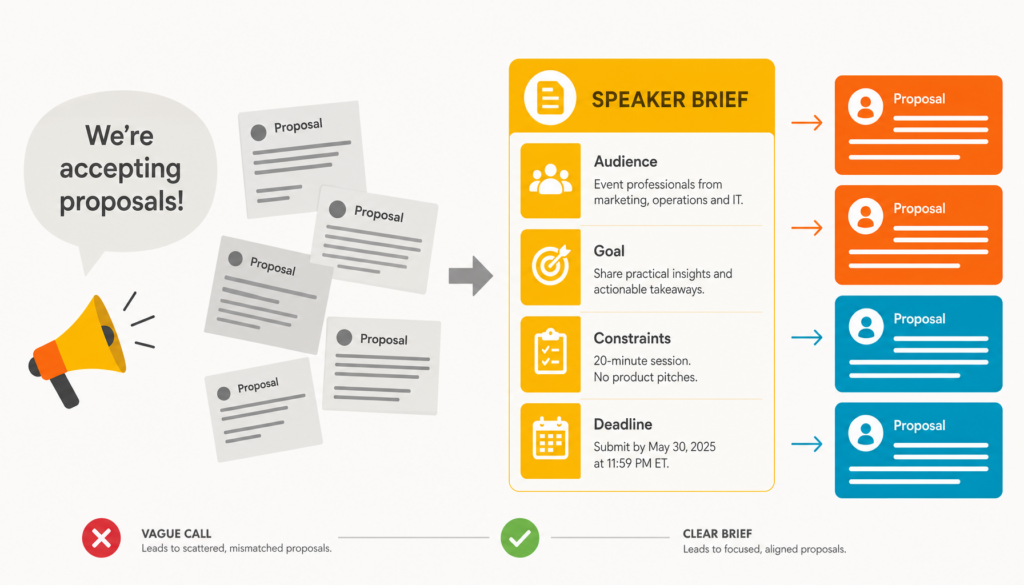
A call for speakers is a public invitation for people to propose sessions for your event. It works best as a brief. Speakers can only pitch what you’ve described, so the call has to spell out the audience, goal, constraints, and deadline.
Many teams write the call as an announcement, something like “We’re accepting proposals!” and then wonder why the pitches come back vague. Brief speakers the way you’d brief a vendor, and the proposals get sharper.
Academic and scientific events often use the term call for papers (CFP), where reviewers read written abstracts. The terms overlap, so the advice here applies to a CFP too.
Associations use the process to source member-led education sessions, and companies use it to find customer and partner stories for user conferences. Either way, the job has two halves. The brief is what you publish, and the handoff is what you do with submissions once they arrive.
What to Include on Your Call for Speakers Page
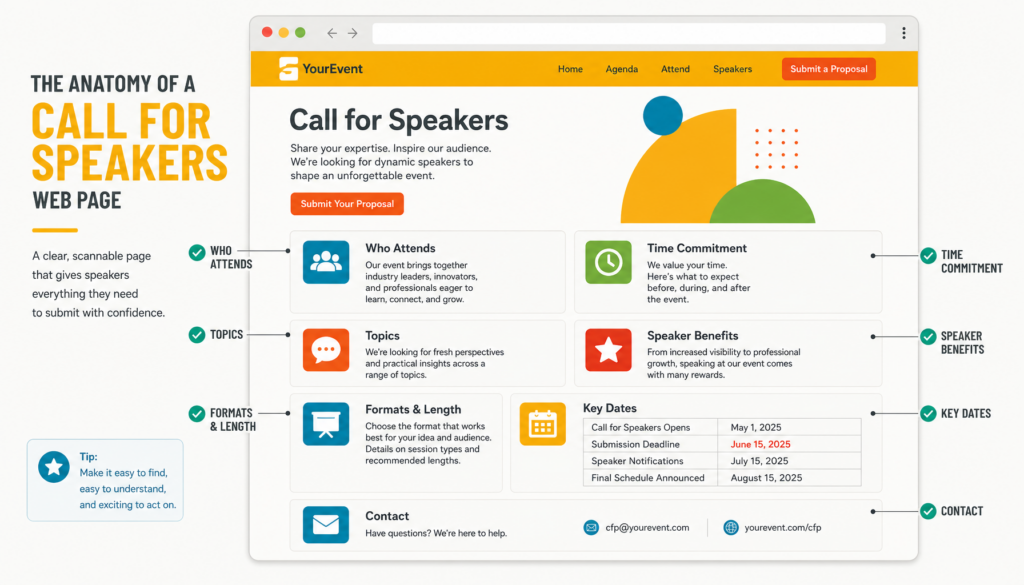
Include everything a speaker needs to decide whether to apply: audience, topics, formats, time commitment, and decision date. Strong practitioners have the least time to guess. If the page leaves gaps, they skip it or submit without understanding the commitment.
Write the page around three questions a speaker asks: is this audience mine, is this format doable, and is it worth my time? Each element below helps answer one of them.
- Event name, dates, location or format (in person, virtual, or hybrid), and a link to the event site
- Who attends, including roles, experience level, and approximate size if you know it
- The theme and topics you want, with two or three example session ideas
- Each session format and its exact length, such as a 30-minute talk or a 90-minute workshop
- An honest time commitment covering prep, any rehearsal or tech check, and the session itself
- Specific speaker benefits, such as a complimentary pass, recording rights, or travel support, if you offer them
- Key dates for opening, closing, decisions, and final materials
- One named contact person or shared inbox
- A line welcoming first-time speakers, if that’s true for your event
Be honest about effort. If a talk needs a rehearsal call and slides due two weeks early, say so on the page. Swap vague promises of visibility for specifics, like a free pass or a recording of the session.
This structure lines up with NIST’s 2023 speaker invitation tips, written for Cybersecurity Career Week organizers. NIST lists the event name, date, and location; the purpose; the audience type and size; and the speaker’s role. It adds why the speaker fits, what they gain, and a contact, and it recommends inviting speakers in phases.
Keep the page skimmable with headings, short paragraphs, and dates in a list or table.
How to Write Selection Criteria for Your Call for Speakers
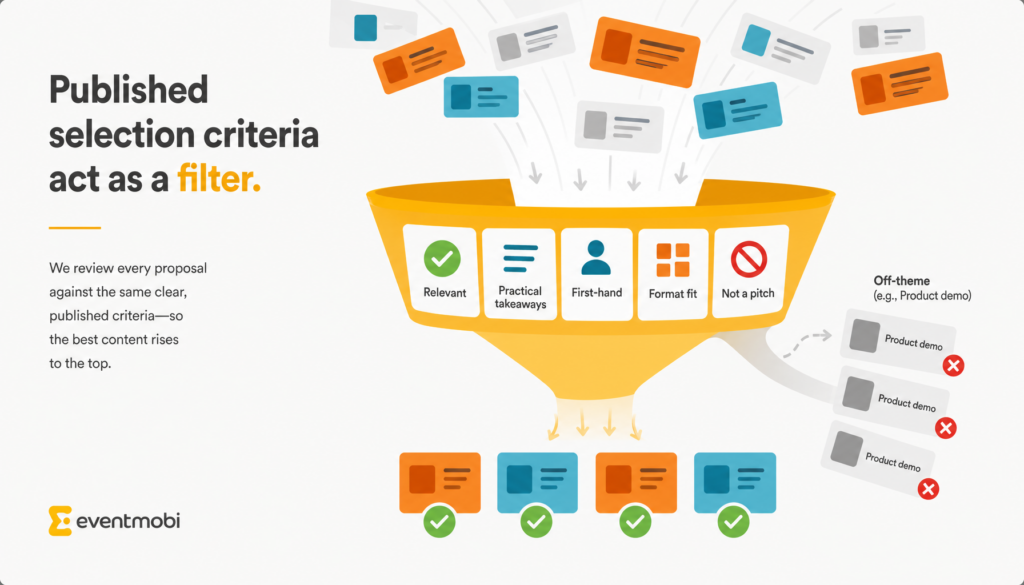
Write four to six plain-language criteria before the page goes live, and publish them on it. Published criteria act as a front-door filter, because speakers who don’t fit tend to self-select out. They also make your own review faster and fairer.
Without them, reviewers spend hours on proposals that were never going to fit. Rejected speakers never learn why, so the same mismatched pitches return next year. Start with criteria like these:
- Relevance to the stated audience and theme
- Clear, practical takeaways attendees can apply
- First-hand experience or original insight
- Fit with a listed format and length
- Educational content, not a product pitch
If certain pitches keep showing up, add a short “What We’re Not Looking For” list. Product demos and talks already given elsewhere this year are good candidates.
The form can enforce the same criteria. Ask for two or three learning outcomes, which forces clear thinking and gives reviewers something concrete to judge. Use dropdowns for track and format so every proposal is sorted on arrival, and set word limits for the title, abstract, and bio.
Tell speakers when they’ll hear back, and keep that promise. A missed decision date costs more goodwill than a polite no.
So how do you make the criteria strict without scaring off first-time speakers? Pair them with a welcome line and one strong example proposal. The example shows what good looks like, which helps a newer speaker more than any rule.
Sample Speaker Selection Rubric
A rubric turns your published criteria into scores, so every reviewer rates proposals the same way. Score each criterion from 1 to 5, multiply by its weight, and compare totals. Use the totals to build a shortlist, then adjust for program balance before you decide.
| Criterion | Weight | Scores a 1 | Scores a 5 |
| Relevance to audience and theme | 30% | Off-theme, or written for a different audience | Addresses a listed topic for the stated audience |
| Practical takeaways | 25% | No clear outcome for attendees | Two or three specific outcomes attendees can apply |
| First-hand experience | 20% | Summarizes other people’s work | Draws on the speaker’s own work, data, or results |
| Format fit | 15% | Doesn’t fit the format or length | Scoped to the chosen format and length |
| Educational, not promotional | 10% | Built around a product or company pitch | Teaches without selling |
The Call for Speakers Kit includes this rubric as an editable scoring sheet.
How to Make Your Call for Speakers Inclusive and Accessible
A call that only reaches your usual network brings back the usual speakers. These steps widen the pool and make it easier for more people to apply:
- Share the call beyond your own channels, such as member groups, partner communities, and industry associations, and ask past speakers to pass it on.
- Say what support you offer first-time speakers, such as an outline review or a rehearsal slot.
- State on the page that you’ll accommodate accessibility needs, and ask for them after acceptance.
- Make the form accessible, with labeled fields, no time limit, and another way to apply on request.
- Hide names and organizations on the first review pass if your process allows it, so proposals are scored on content.
- Check the mix of your shortlist, such as topics, experience levels, organization types, and regions, before you send decisions.
Call for Speakers Template: Page Copy, Form Fields, and Timeline
Get the full Call for Speakers Kit: an editable page and form template, a speaker selection rubric, acceptance, rejection, and waitlist email templates, and a speaker promo pack.
This call for speakers template gives you three pieces to copy and adapt: public page copy, form fields, and a sample timeline. The copy sets expectations, the form collects only what review needs, and the timeline protects your decision dates.
Starting from a blank page is slow, and it’s easy to rebuild the same form every year from last year’s spreadsheet. A template only helps if it carries both the brief and the handoff. The template below covers the essentials. The downloadable Call for Speakers Kit adds editable versions, a scoring sheet, decision email templates, and a promo pack for confirmed speakers.
Public Call for Speakers Page Copy
Replace each bracketed placeholder with your details, and cut any part that doesn’t apply.
- Headline: “Speak at [Event Name] [Year]: Share What Works with [Audience]”
- Opening line: “[Event Name] brings together [number, if known] [audience roles] in [city or online] on [dates]. We’re looking for practitioners who can share [theme] in a way attendees can use the next day.”
- Who attends: “Attendees are [role 1], [role 2], and [role 3], with [experience level] experience in [field].”
- Topics we want: “We want sessions on [topic 1], [topic 2], and [topic 3]. Example session title: [Example Session Title].”
- What we’re not looking for: “Please skip [product demos], [talks already given this year], and [off-theme topic].”
- Session formats: “[Talk]: [30] minutes, including audience questions. [Panel]: [45] minutes with [3] speakers. [Workshop]: [90] minutes, hands-on.”
- What speakers can expect: “Plan on about [hours] of prep, a [30]-minute tech check on [date], and your session. Accepted speakers receive [a complimentary pass], [a session recording], and [travel support, if offered].”
- How we select sessions: “We review proposals against these criteria: [relevance to audience and theme], [practical takeaways], [first-hand experience], [format fit], and [educational, not promotional].”
- Key dates: “Submissions open [date]. Submissions close [date]. Decisions sent [date]. Final materials due [date]. Event: [dates].”
- How to apply: “Submit through [link]. It takes about [15] minutes. For questions, contact [Name] at [email].”
- First-time speakers: “First-time speakers are welcome. [Describe any support, such as an outline review or rehearsal slot.]”
Speaker Application Form Fields
Keep the form short enough to finish in one sitting. Each field below earns its place by feeding into review or the program.
| Field | Required? | Why You Need It |
| Full name | Yes | Speaker profile and communications |
| Yes | Decisions and follow-up | |
| Job title and organization | Yes | Credibility and audience fit |
| Short bio ([100] words max) | Yes | Program listing if accepted |
| Session title ([12] words max) | Yes | First read for reviewers |
| Session description ([200] words max) | Yes | Core of the review |
| Format | Yes (dropdown) | Matches your published formats |
| Track or topic | Yes (dropdown) | Sorts proposals on arrival |
| Audience level | Yes (dropdown) | Program balance |
| 2 to 3 learning outcomes | Yes | Tests clarity and takeaways |
| Link to past talk or writing | Optional | Helps with first-time and unknown speakers |
| Availability on event dates | Yes | Avoids late drop-outs |
| Supporting file (outline or slides) | Optional | Extra detail for close calls |
A short call for speakers form gets more complete submissions, and these details only matter for the speakers you accept. Collect them after acceptance:
- Headshot
- Final bio
- Audiovisual (A/V) and accessibility needs
- Travel details
- Recording consent
Sample Call for Speakers Timeline
Here’s a sample timeline for a mid-size conference, counted in weeks before the event. Treat it as a starting point and adjust the weeks to fit your program.
| Weeks Before Event | Milestone |
| 26 | Set theme, formats, and selection criteria |
| 24 | Publish the page and open submissions |
| 18 | Send a reminder two weeks before closing |
| 16 | Close submissions |
| 16 to 13 | Review and shortlist |
| 12 | Send acceptance and rejection emails |
| 12 to 10 | Collect headshots, final bios, and A/V needs |
| 10 to 8 | Build sessions and publish the agenda |
Smaller events can compress this schedule, but keep submissions open for at least 4 weeks and allow about 4 more for review and program build.
How to Review Call for Speakers Proposals and Send Decisions

Good review depends on one habit: separate deciding from notifying. Review every proposal in one place, keep a maybe list, and send decisions only once the program is final. Rejections go out on the date you promised, with a kind and specific note.
When decisions live across inboxes, spreadsheet tabs, and comment threads, nobody is sure who’s been told what. Teams that accept early get stuck when a stronger proposal arrives, or a confirmed speaker drops out.
Strong call for speakers management starts with the criteria you published. Tag each proposal against them so similar proposals get the same answer for the same reasons. If a committee weighs in, gather its input in one place rather than in separate email threads.
Hold a short maybe pile of solid proposals that missed the first cut. When a speaker drops out, you can fill the slot without reopening the call.
Rejected speakers deserve something useful. Thank them, add context such as how many proposals you received if you want to share that number, and name the criterion the proposal missed. An invitation to attend or apply next year keeps the door open.
In EventMobi’s Call for Speakers, every proposal sits in one table with its status, submission date, and notes. Changing a status doesn’t email anyone, so proposals can stay pending while the program settles. When you’re ready, you send acceptance and rejection emails individually or in bulk and can see which speakers have been notified.
From Accepted Proposals to Published Program
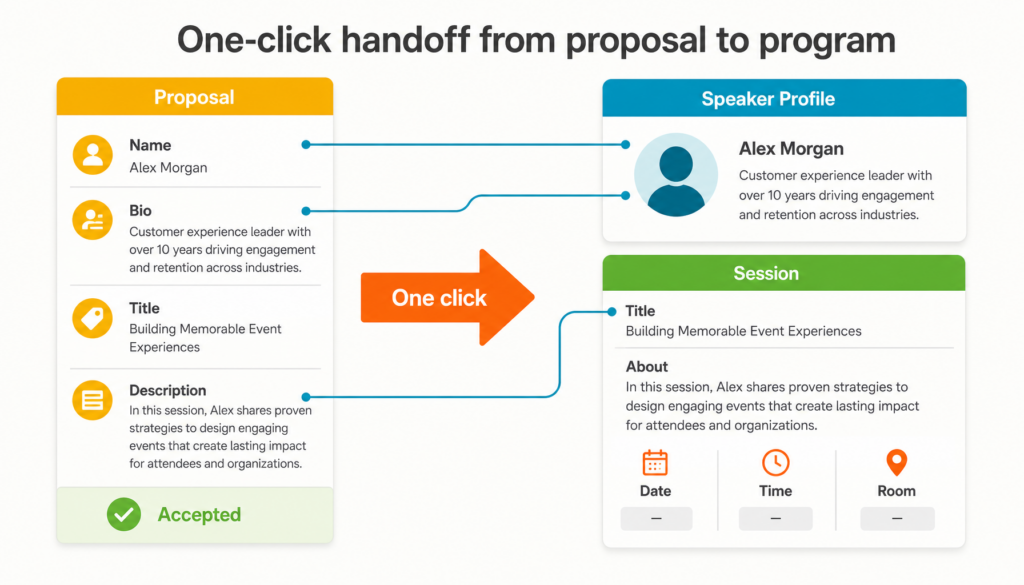
Plan the handoff before the call opens. Match every form field to something your speaker profiles and session listings need, so accepted proposals already hold the right data. Then collect the remaining assets in one request instead of a string of reminders.
Acceptance is usually when the second round of data entry starts. Someone copies names, bios, and descriptions into speaker profiles and sessions, then chases missing bios and headshots days before the event.
Mapping pays off most on the fields attendees will read. Ask for the title, description, and bio in the length your agenda displays, so nothing needs rewriting after acceptance.
If you’re comparing call for speakers software, ask these questions:
- Can speakers apply without creating an account?
- Can you control when decision emails go out?
- Do accepted proposals become sessions without retyping?
- Can reviewers score and comment on proposals in one place?
- Can you see which speakers have been notified?
- Does it connect to your registration, agenda, and event app?
In EventMobi, one click turns an accepted proposal into a pre-filled speaker profile and session record, with uploaded files attached. The proposal description fills the session’s About field, and you add the date, time, room, and headshot afterward. Because Call for Speakers sits on the same platform as registration and the event app, there’s no export or sync to maintain.
Call for Speakers FAQ
These frequently asked questions (FAQ) cover terminology, timing, form fields, and rejections.
Your Next Step: Write the Brief Before You Open the Call
Clear brief in, clean handoff out. Before you publish, write down your selection criteria and your decision date. Next, check every form field against the program, and cut any field that doesn’t feed review, a speaker profile, or a session listing.
Once speakers are confirmed, give them reasons and tools to promote the event, and turn confirmed speakers into event advocates. For keynotes and other invited speakers, see EventMobi’s guide to finding, introducing, and thanking event speakers.
The proposals you get back can only be as specific as the call you write.

A demo walks you through sorting submissions by status, timing decision emails, and turning accepted pitches into sessions without retyping.
