Mobile Badge Printing for Events: Change Where (and How) Events Begin
Picture two versions of the same conference opening.
Version one: A long table anchors the hotel lobby. Staff stand behind alphabetized badge bins, searching through pre-printed badges while attendees wait and double-check spellings. A line snakes toward the elevator bank. The line is not moving.
Version two: Attendees walk into the atrium and see welcome stations positioned near every entrance. An iPad, a compact printer, a quick QR scan, and their badge prints on demand. People keep moving toward coffee, conversations, and sessions.
The question is not whether check-in matters. You already know it does. The question is: How do you run fast, resilient check-in that prevents lines during peak arrivals, even when your venue layout (or Wi-Fi) works against you?
TL;DR: Mobile badge printing moves the print and check-in function to where people arrive, using portable stations (iPad + compact label printer + check-in software) to print badges on demand so attendees can keep moving and staff can stay ahead of exceptions.
In this article you’ll see what mobile badge printing looks like onsite, how to choose a connectivity setup that stays reliable under pressure, and a station plan to keep check-in moving when exceptions happen. If you want to get started planning right away, remember to map your busiest 30-minute arrival window first, size stations to that peak, not just total headcount.
If you want foundational context on badge formats, layouts, and production, start with EventMobi’s complete conference badge design and printing guide.
Why the Registration Desk Has Always Been a Compromise
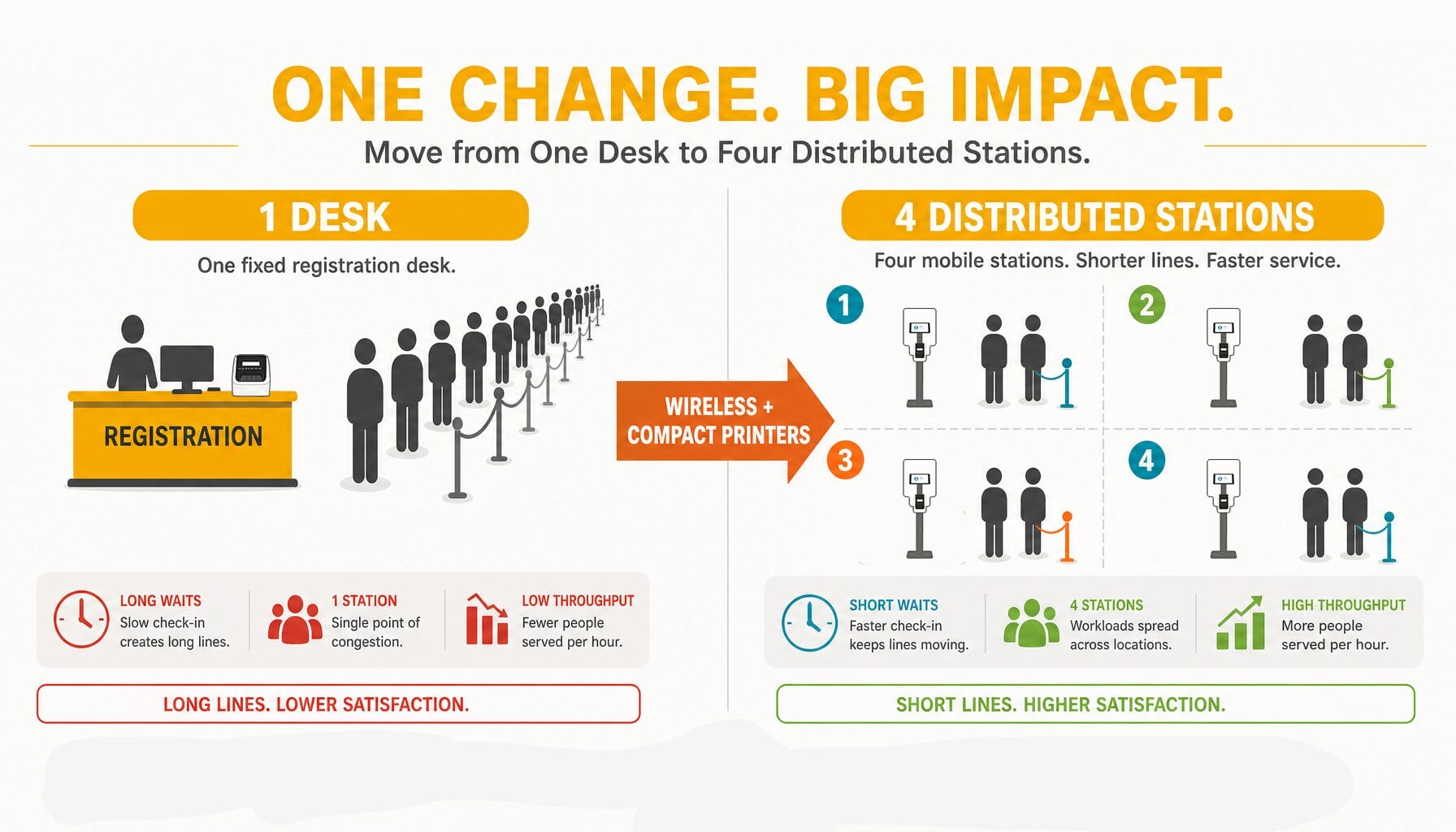
A traditional registration desk isn’t inherently wrong — it’s a fixed constraint that forces arrivals, badge printing, and the check-in process to revolve around one physical point.
What the fixed setup demands:
- A single, predetermined location, often chosen for power outlets and counter space rather than attendee flow
- Wired printers or pre-printed badge stacks sorted alphabetically, which limit flexibility
- Staff fixed in one spot through the entire arrival period, increasing fatigue during peaks
- Attendees funneled through a single point even when the venue has multiple entrances, creating avoidable queues
Downstream effects are predictable: one long line, stressed staff, frustrated attendees, and exceptions (misspellings, missing records, walk-ins, reprints) that slow the entire operation.
The root cause is rarely poor planning; it’s that printing and check-in workflows were historically anchored to tables and outlets, so the arrival experience was designed around equipment rather than attendees.
What changed is practical: printers shrank, label printing got faster, and wireless options became common. Those shifts let planners move badge printing closer to entrances — but only if you treat badge printing as an operational system, not just a piece of equipment.
Quick example: rather than one central desk handling 300 arrivals in 45 minutes, four distributed stations each handling 75 people can reduce queue length and speed throughput — staffing and station type still matter, but distributing the load reduces peak wait time more effectively than adding more printers to one desk.
What “Mobile Badge Printing” Actually Means in Practice
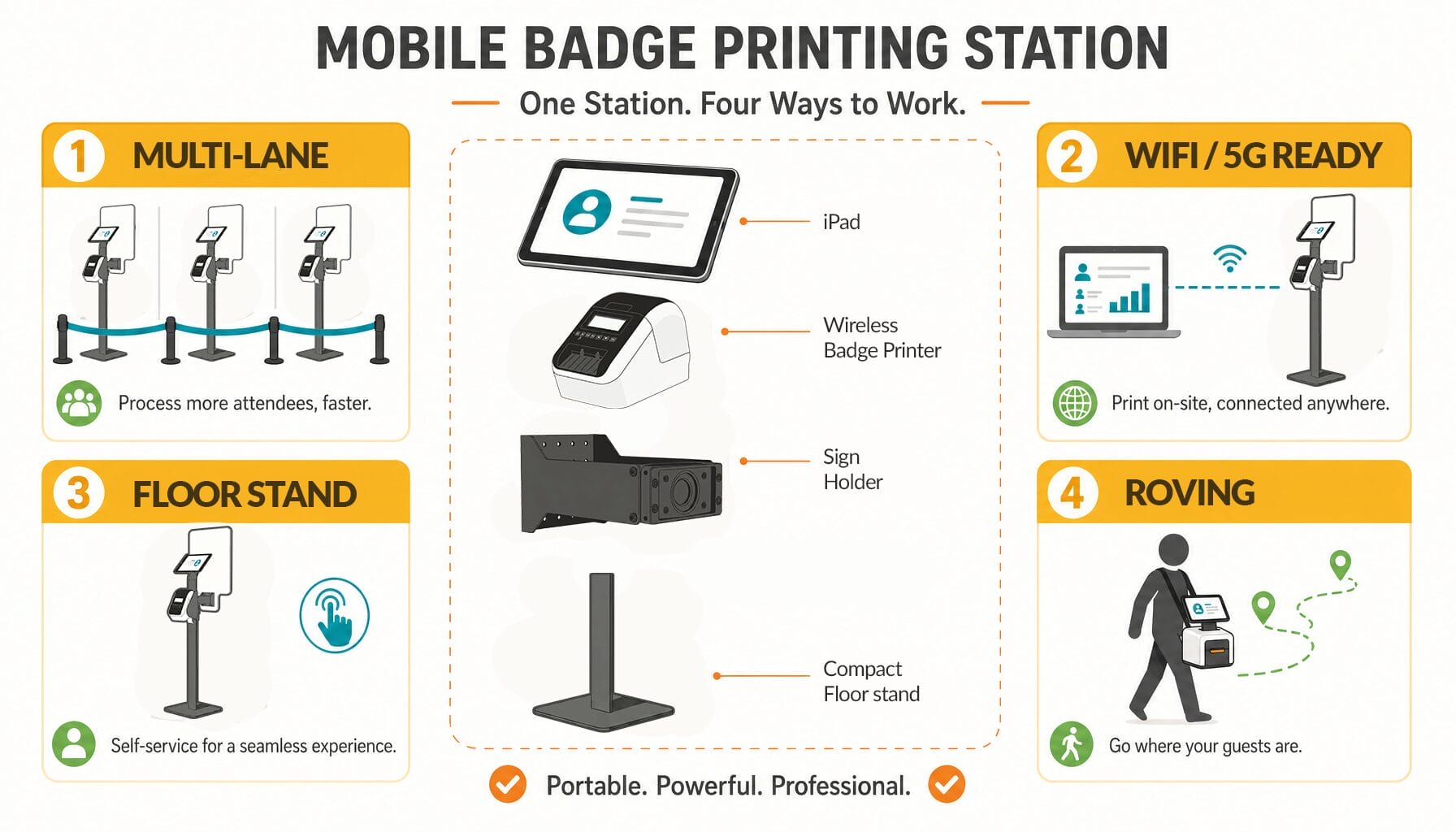
“Mobile” covers several approaches. In event check-in it means moving personalized badge production out of a single desk and into portable stations placed where attendees arrive.
Mobile badge printing typically means a portable badge printing station — an iPad or iPhone running check-in software paired with a compact label printer to produce personalized badges or labels on demand. Stations can sit at entrances, session doors, or sponsor areas instead of a single desk.
Industry guidance increasingly favors printing on demand at the venue over full pre-print runs — it reduces waste and makes last-minute changes easier.
Definition (quick): a portable station that ties attendee lookup (QR scan or name search) to on-demand printing so each attendee leaves immediately with a badge or label.
Operational benefits:
- Multi-lane check-in: spread stations across a lobby to reduce queues.
- Satellite and session stations: speakers, exhibitors, and VIPs can be serviced at secondary entrances or session doors.
- Kiosk/self-serve: attendees scan a QR and print without long staff interaction.
- Roving staff: portable units for outdoor events, receptions, or hosted-buyer programs.
Operational gain: distributed load. Route attendees to the nearest station, keep exceptions out of the fastest lanes, and reduce the visible queue — improving attendee experience and reducing staff stress.
You may see this framed as “wireless badge printing events” or “onsite check-in anywhere.” The idea is practical: move check-in to where it minimizes lines and confusion, and choose the right badge printing and check-in platform to support those station types.
Reg-Ception: When Registration Becomes the Reception
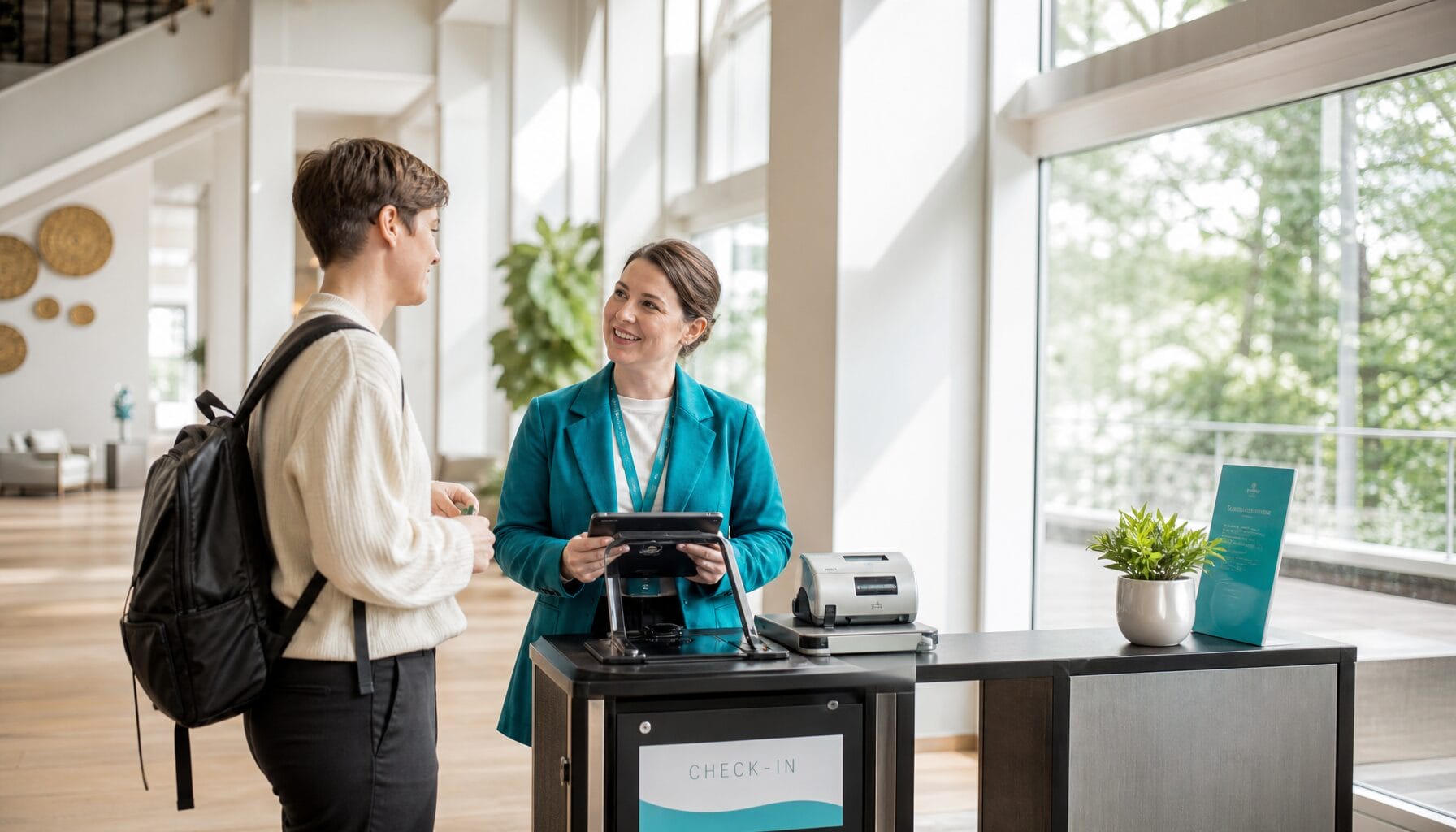
Here is the planning question that changes your layout decisions: What if registration and your welcome reception were not two separate moments?
“Reg-Ception” is the operational concept of combining check-in and welcome into one intentional experience. You still have the same operational requirements, but you stop forcing attendees to “process” before they can participate.
Traditional flow:
- Attendee enters venue
- Finds registration desk
- Waits in line
- Gets badge
- Proceeds to coffee, networking, or the program
Reg-Ception flow:
- Attendee enters directly into the welcome environment
- Badge printing happens within that space, at welcome stations
- Staff greet and check in at the same time
- Attendees move naturally into the event
From a planner’s perspective, the shift matters for three reasons. It removes the “dead zone” where people feel stuck waiting. It reduces duplication of space and staffing, because you are not running two separate zones. And it makes flow easier to manage, because arrivals disperse instead of piling up.
Scenarios where Reg-Ception fits well:
- Hotel atrium welcome with stations near coffee, seating, and sponsor displays
- Outdoor opener where staff can check people in without a visible desk
- VIP dinner arrivals with discreet check-in at the door
- Day-two “breakfast check-in” for multi-day conferences
If you’re considering Reg-Ception, a short checklist helps: clear signage, visible welcome stations near arrival points, staff trained to greet-and-badge, a small exception desk for reprints, and sponsor placement that doesn’t block flow. These practical steps make the welcome feel like part of the event, not a separate administrative chore.
A quick pun, because planners deserve one: if you can make check-in feel less like “registration” and more like “reception,” you have officially earned your Reg-Ceptionist badge.
The Connectivity Layer: What Makes Mobile Printing Reliable (or Not)
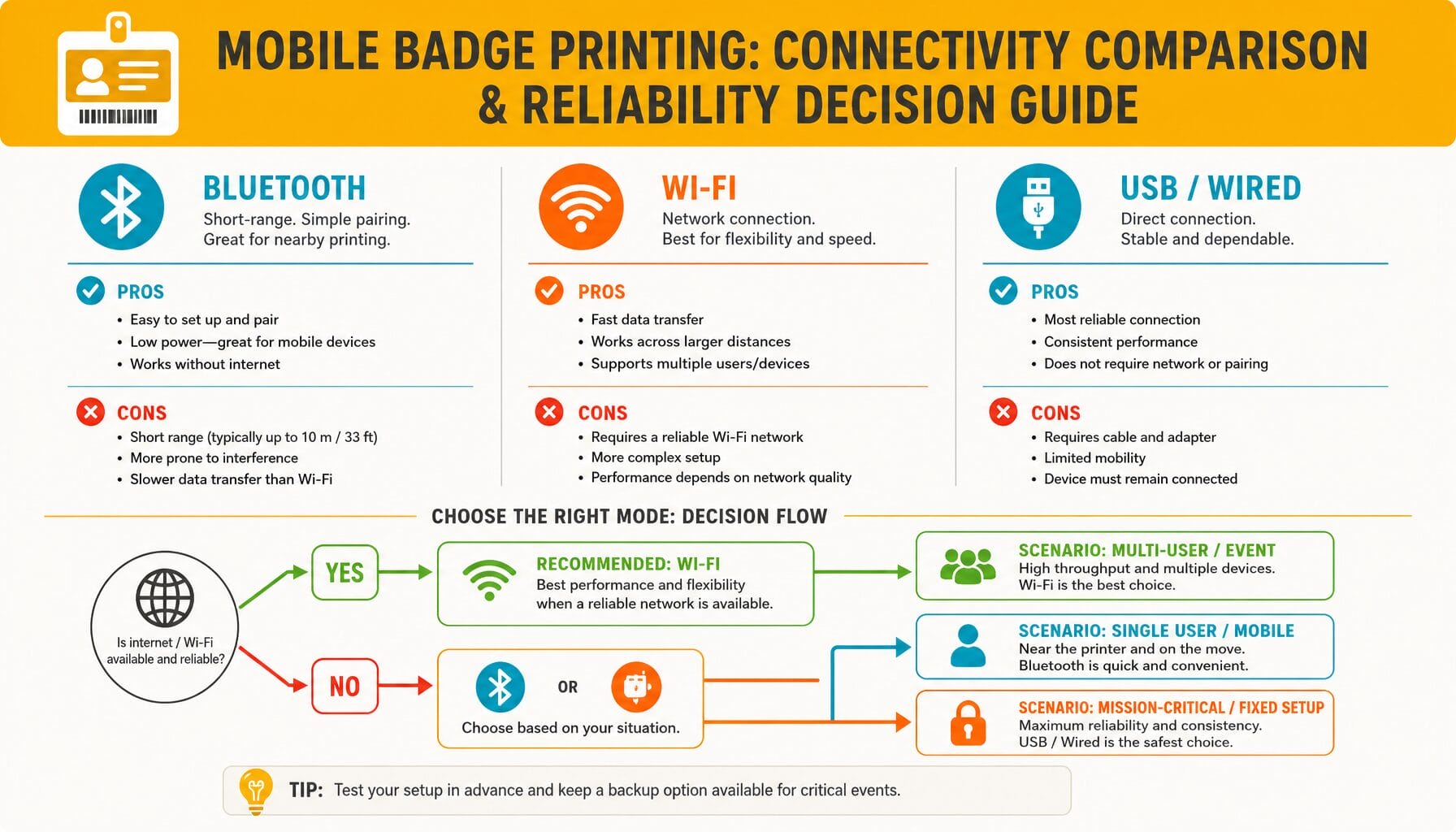
Mobility only helps if it’s dependable — and dependability, for mobile badge printing, comes down to connectivity and redundancy.
Ask yourself before doors open: What happens to check-in if the network gets crowded, a device drops a connection, or a printer needs to be swapped?
There are three common ways to connect a device to a printer for onsite badge printing — each has clear trade-offs. Use this short cheat-sheet when you plan station roles.
The Three Connectivity Modes
1. Bluetooth badge printer conference setups
- How it works: one device pairs directly to one printer via Bluetooth.
- Range & reliability: best at short distances (many teams plan ~30 feet in open areas), and once paired it doesn’t depend on venue Wi‑Fi.
- Best for: roving staff, satellite, or truly single‑device self‑serve kiosks where one-to-one pairing is acceptable.
2. Wi‑Fi badge printer events
- How it works: printer joins a Wi‑Fi network and devices on that network send print jobs.
- Range & reliability: can be venue‑wide if coverage is strong — but performance can vary at peak arrival times.
- Best for: fixed stations where you control the network or can secure a dedicated SSID for check-in and printing.
3. USB or wired (Ethernet or direct cable)
- How it works: printer connects by cable to a computer or a network switch.
- Range & reliability: limited by cable length but typically the most consistent choice for high‑volume fixed stations.
- Best for: primary, high‑volume check-in points where predictability matters most.
A Practical Recommendation Framework
Match station role to connectivity: roving and temporary satellites → Bluetooth; primary high-volume lanes → wired (USB/Ethernet) as insurance; and Wi‑Fi when you can control or dedicate the network. A common, resilient pattern is a wired main bank with multiple Bluetooth satellites at entrances.
What Requires Internet vs. What Does Not
This is a common risk area in onsite badge printing network requirements. Plan around what must be live and what can be local.
Printing can usually continue without live internet if attendee data is already on the check-in device and the local printer connection remains intact (Bluetooth, local Wi‑Fi, or wired).
- Works offline: check-in and print for attendees whose records were synced pre-event.
- May need internet: real-time syncing with online registration, pushing new walk-ins to other devices, and live analytics or lead retrieval integrations.
Because of these trade-offs many teams build redundancy: spare printers, local copies of attendee lists on each device, and a failover plan (e.g., continue printing locally while queuing syncs to the cloud).
Quick micro-scenario (practical): main lobby with 400 peak arrivals in 45 minutes → wired bank of 6 stations (primary), plus 4 Bluetooth satellite kiosks at secondary entrances. Spare printer and spare label rolls staged nearby; one dedicated exception/reprint station to keep the fast lanes flowing.
The takeaway: badge printer connectivity is not a detail — it is central to your risk plan. Match station type to connection mode, pre-sync attendee data, and plan redundancies so printing keeps moving even when networks don’t.
Setting Up a Mobile Badge Printing Station That Won’t Let You Down
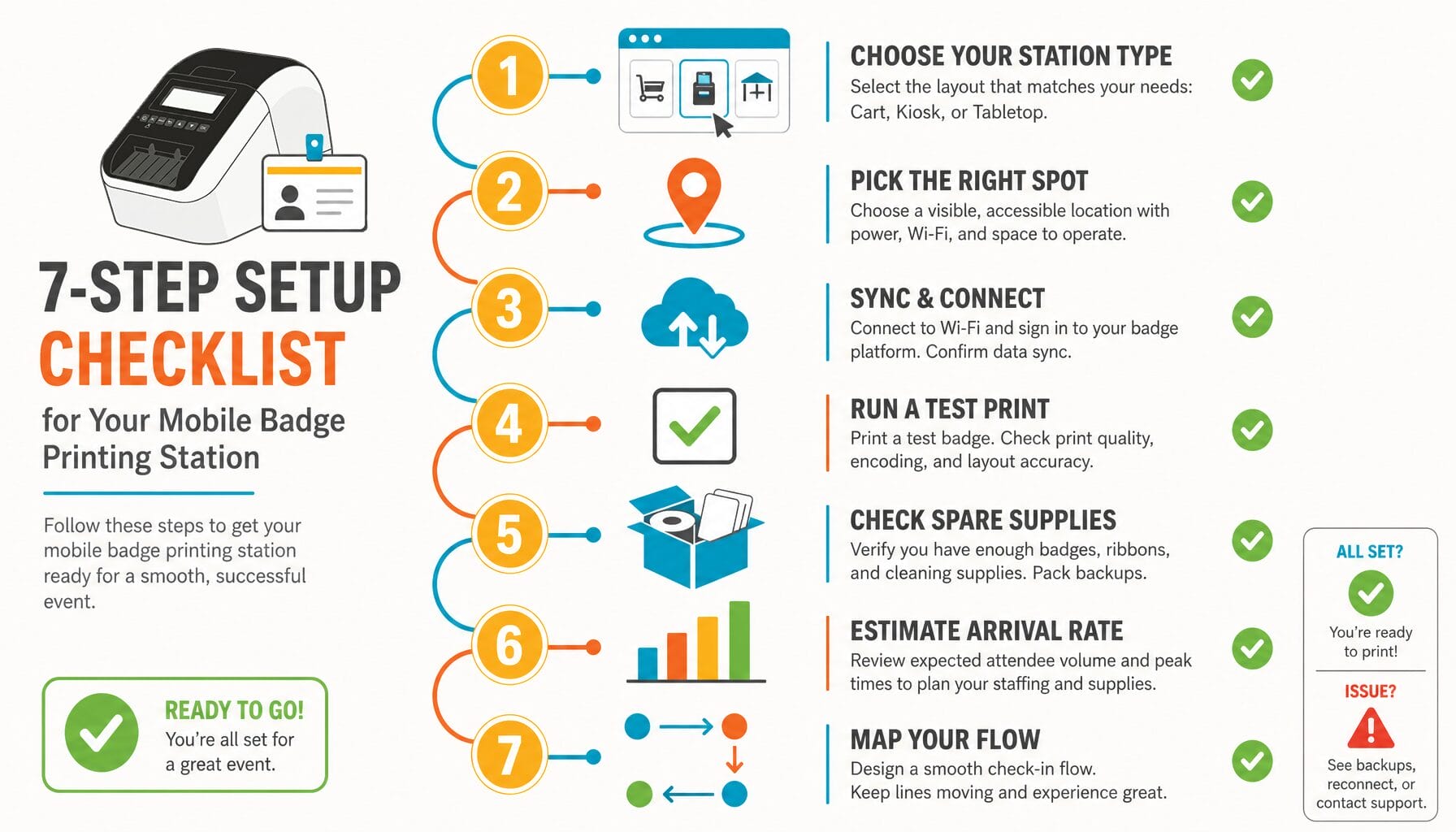
You can buy hardware; the harder work is building operational readiness. Below is a practical, planner-friendly setup you can use on-site to make badge printing a reliable part of the attendee experience.
1. Pick Your Station Type, Then Match Connectivity
Start with the job each station needs to do — that drives whether you choose Bluetooth, Wi‑Fi, or wired printing.
- Roving station: staff carry an iPad plus compact label printer — Bluetooth is usually the simplest, most portable fit for roving badging.
- Fixed satellite station: at a secondary entrance or session foyer. Bluetooth can work; choose wired if the station truly stays put for the event.
- Self-serve kiosk: attendee-facing and needs stability — wired or dedicated Wi‑Fi, plus nearby staff support for exceptions.
- Primary high-volume station: most arrivals in a short window — wired (USB/Ethernet) is often the most predictable choice for these lanes.
2. Confirm Placement and Respect Real-World Range
For Bluetooth setups: plan for short distances and test the actual space. Avoid placing printers behind metal fixtures or in high-interference areas; favor line-of-sight when possible.
For all stations: place units where attendees actually arrive (not where it’s easiest for staff to supervise), keep lines from blocking elevators and doors, and use clear signage so people don’t hesitate and create slowdowns.
3. Sync Attendee Data Before Doors Open
Treat data sync like a pre-flight checklist:
- Confirm the full attendee list is available locally on each check-in device.
- Verify the fields you plan to print (name, company, title, QR) match your badge template and fit the label stock.
- Align on your walk-in workflow so staff know where to add new records and how to handle sync delays.
If you rely on live internet to fetch every record during peak arrivals, you create a single point of failure — avoid this by syncing pre-event and keeping local fallbacks.
4. Test Printing in Real Conditions
Don’t wait for the first attendee to discover problems:
- Confirm label stock fits the chosen printer and orientation.
- Print and scan QR codes to confirm readability in venue lighting and at the expected distances.
- Run at least 10 full test prints with the exact stock and printer settings you’ll use for the event; include names that test long strings and special characters.
5. Define the Onsite Fallback
Something will go wrong. Plan to keep your main flow moving anyway.
Plan for:
- A spare printer, charged and ready with the same configuration.
- Spare label rolls and the right power/adapter cables.
- A manual name-lookup process when QR codes fail (a dedicated tablet and a clear exception workflow).
- A dedicated exception or reprint station so you do not clog your fastest lanes.
6. Think in Arrival Rate, Not Total Attendees
Instead of asking, “How big is my event?” ask, “How many people will show up in the busiest 30 minutes?”
A practical approach: size stations to your peak arrival rush and add an exception path. Often adding stations across entrances improves throughput more than adding extra printers at a single desk because human handoffs and exceptions create the bottlenecks.
Sample sizing for planning (illustrative): small event peak 60 people/30 min → 2 stations; medium peak 200/30 min → 5–6 stations; large peak 600/30 min → 15+ stations (adjust for expected exception rates). Use these as a starting point and test with volunteers.
7. Position for Flow, Not Staff Convenience
If the venue has multiple entry points, distribute stations accordingly: put more where most attendees enter, still cover secondary entrances, keep stations visible and clearly signed, and space them so they don’t create new bottlenecks.
When you plan for flow, the technology becomes less visible — attendees get name badges quickly, staff stay calmer, and the event starts on a positive note.
EventMobi BadgeON™: Built for This
If you are considering mobile badge printing, you’ll ask the practical question: Can one system handle check-in, attendee data, and printing across multiple stations without creating new failure points?
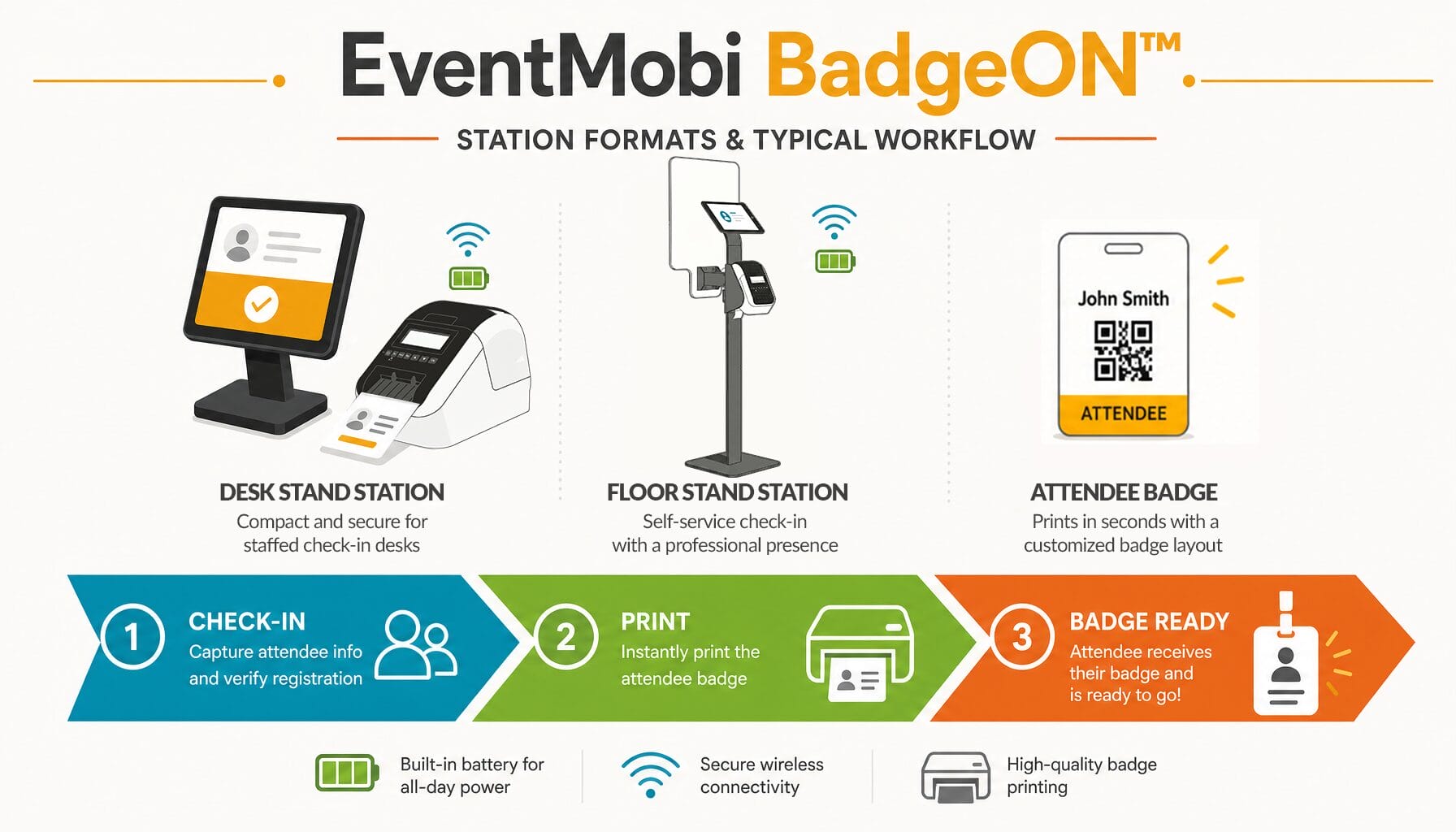
BadgeON™ is EventMobi’s onsite check-in and label printing solution built to support both portable and fixed station setups — a badge printing solution that aims to tie registration, printing, and check-in into a single platform rather than separate point solutions.
Plain-Language Workflow
A typical workflow looks like this:
- Attendee scans a QR code, or staff search by name on an iPad
- The attendee record is found in the platform
- The print job is sent to a compact label printer
- The badge or label prints on demand and the attendee is checked in; data syncs back to registration when a connection is available.
Station Formats You Can Build Around
BadgeON™ supports common station formats so you can design around flow and role:
- Battery-capable floor stand units for welcome stations placed around an atrium or reception area (ideal for Reg-Ception setups).
- Desk-mounted stations for higher-volume, fixed check-in points where wired reliability is preferred.
Why Label Printing Is Often Used for Onsite Check-In
Label printing separates two needs: pre-branded badge stock for consistent sponsor design, and on-demand personalization for accurate names, titles, and QR codes at arrival. Reprints usually mean reprinting a small label rather than replacing a full pre-printed badge — a practical printing solution for busy events.
Hardware Note: What Matters Operationally
BadgeON™ lists compatible printers and commonly supports the Brother QL-820WNB label printer — a popular choice because it:
- Uses thermal printing, so there’s no ink or toner to replace mid-event
- Supports wireless connectivity options for Bluetooth or Wi‑Fi setups
- Offers an optional battery for true portability in roving and floor-stand units
If you want a deeper walkthrough of how onsite label printing moves from check-in device to printed badge, see how onsite label printing works from check-in device to printed badge and onsite badge printing platforms by hardware compatibility and connectivity for more details. If you’d like to get started quickly, BadgeON™ also offers demo options and planning support to map station formats to your arrival patterns.
Conclusion
If check-in is stuck at a single desk, arrivals become a bottleneck and the first impression suffers. Mobile badge printing gives you a different option: distribute stations across entrances and welcome areas so attendees get their badges quickly and the line never becomes the welcome.
Bottom line: treat mobile badge printing as an operational system, not just equipment.
Three next steps to get started:
- Define station roles (roving, satellite, kiosk, primary) and map them to expected arrival rates.
- Choose printer connectivity that fits each role (Bluetooth for portable, wired for high-volume), then pre-sync attendee data to devices.
- Test printing in real conditions, stage spares (printer, rolls, cables), and define a clear exception path.
When you do, check-in becomes less visible, staff stay calmer, and attendees start the event feeling welcomed rather than processed.
Want to see how a distributed check-in setup could work for your event? Book a demo, that’s tailored to your arrival flow.
Mobile Badge Printing FAQs
