Speaker Application Form: What to Ask Now and What to Save for Later
You open your call for speakers, and proposals arrive with three-page bios, flight preferences, and signed recording releases. Yet many skip the one answer reviewers need most: what attendees will walk away with. That gap usually starts with the speaker application form itself.
Introduction
If you run speaker intake with a form builder, a spreadsheet, and an inbox, you’ve probably seen this firsthand. Most guides to the speaker application form cover what to include. The more useful question is when to ask for it.
Here’s the short answer: ask only what reviewers need to decide, and save logistics for after acceptance. Headshots, travel, audio-visual (AV) needs, and contracts can wait until you know who’s on the program.
Why be this strict? Zuko’s form benchmarking research found an average starter-to-completion rate of 51.7% across about 739 forms and 93 million views from January 2022 to April 2025. In other words, about half of the people who start a form don’t finish it.
That benchmark spans many kinds of online forms, so treat it as a reminder rather than a speaker-form statistic. Every field in your call for speakers should earn its place. Below, you’ll find what to ask, what to save, a two-stage framework, and a pre-launch checklist.
Why Most Speaker Forms Ask Too Much, Too Early
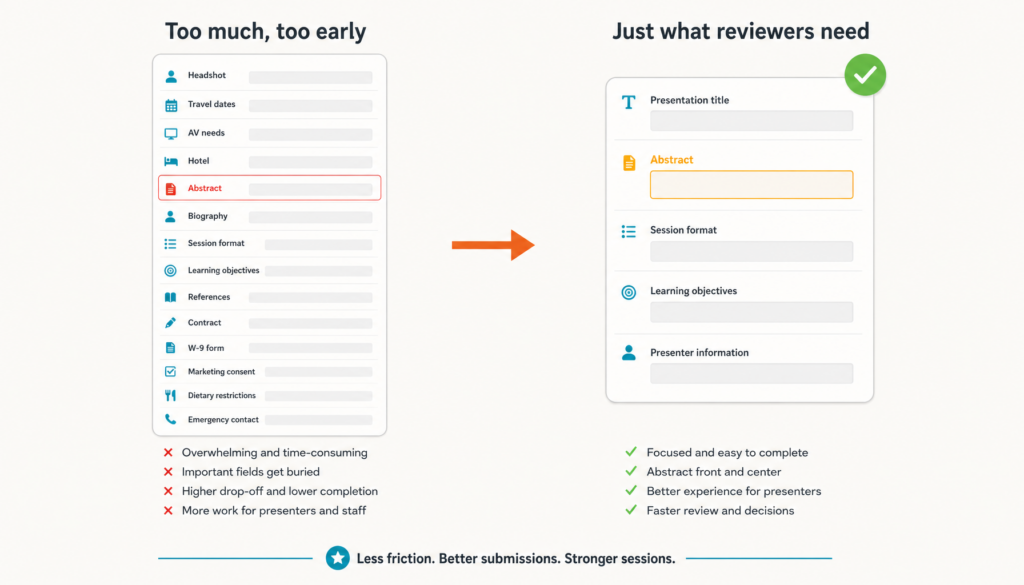
Templates are usually the culprit. A team copies a form that lists every field a speaker might ever need: headshot, travel dates, AV requests, availability, and contract terms. Speakers face that long form before they even know whether they’re accepted.
Reviewers pay for it too. They scroll past hotel preferences and microphone requests to reach the abstract, the one answer they need. Multiply that by dozens of proposals, and review time drains into details that don’t affect the decision.
Picture an association annual conference with 120 proposals for 40 sessions. Collecting logistics up front means gathering 80 sets of travel dates, AV needs, and headshots you’ll never use. Even the 40 sets you keep often go stale by event week, as speakers change flights, job titles, and slides.
Is the fix simply fewer fields? Not quite, because relevance matters more than count. Eight focused questions can work well, while a five-field form padded with logistics still wastes everyone’s time.
So run every field through one test: Does a reviewer need this to decide? If yes, it stays on the form. If no, it moves to a later request that only accepted speakers receive.
That test also shapes how you build the form. In EventMobi’s Call for Speakers, each custom field is either mapped to the People Library or kept as submission-only, visible just to reviewers. Setting up the form means deciding, field by field, what it’s for.
What to Ask on Your Speaker Application Form
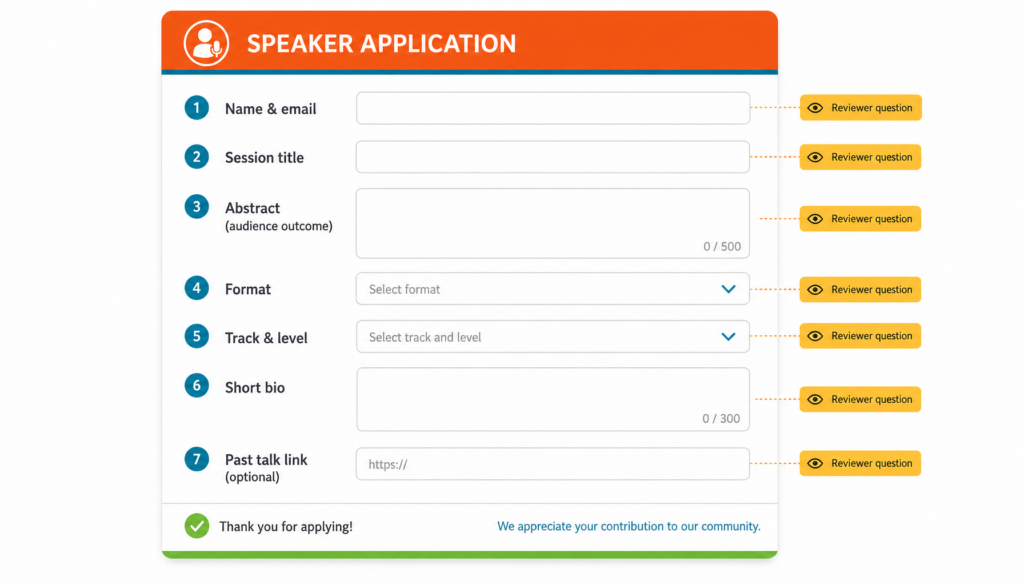
So what does a reviewer need to see? Without a clear standard, reviewers end up judging polish instead of fit. Keep the form short, and make each field answer one reviewer question:
- Name and email, so you know who to contact about the decision
- Session title, so reviewers see the pitch at a glance
- Abstract built around audience outcome, so reviewers can judge value to attendees
- Session format, such as talk, panel, or workshop, so reviewers can check program fit
- Track and audience level, so reviewers can balance the agenda
- Short bio with job title and organization, so reviewers can judge credibility
- Optional link to a past talk, so reviewers can gauge delivery
For the abstract, Gravity Forms’ guide to speaker management recommends one prompt above all: what will the audience leave knowing or able to do? The guide says this question separates good proposals from weak ones faster than anything else. It puts the ideal abstract length at 1,500 to 2,000 characters.
Put each limit right next to its field, such as about 100 words for the bio. Use dropdowns for format, track, and audience level, so answers land in the same few categories. Free-text answers to those questions only create sorting work later.
Short, consistent answers help everyone involved. Speakers finish faster, reviewers compare like with like, and decisions move sooner. There’s also far less cleanup once the program takes shape.
Your field choices also decide what carries forward after acceptance. EventMobi’s Call for Speakers offers text, dropdown, and file upload fields on a branded submission page, with no EventMobi account needed to submit. When you accept a proposal, its description pre-fills the session’s About field, so nobody rewrites the abstract.
What to Save for After Acceptance

Where do headshots, travel, and AV needs go, then? Leave them out of your plan and you’ll chase them later, but collect them too early and they go stale. The middle path is a planned second request sent only to accepted speakers.
Example: One government event team with more than 150 speakers was still chasing missing bios, headshots, and registration details days before the event.
These details matter; they just don’t help anyone decide. Put them in a separate request:
- Headshot
- Final, edited bio
- AV and room setup needs
- Travel and accommodation
- Availability and preferred time slots
- Contract, release, and recording consent
Timing makes this request work. Send it with the acceptance email or right after, while the good news is fresh. Set a firm due date well before your program and event app go live, and schedule one reminder ahead of it.
Keep this request as tight as the application form. Ask for the final bio within the same word limit, and explain exactly how you’ll use the headshot. Speakers respond faster when they can see why each item matters.
The due date also gives you a natural checkpoint. Anyone who misses it gets a personal follow-up while there are still weeks to fill gaps before the event./
The handoff from proposal to program is where retyping usually creeps in. With EventMobi, one click on an accepted proposal creates the speaker profile and the session, pre-filled with submitted data. Organizers then add headshots in the People Library, which fits the after-acceptance approach.
Still retyping speaker details or chasing bios in event week?
EventMobi turns each accepted proposal into a pre-filled speaker profile and session with one click. See how the submission form and review workspace connect.
A Two-Stage Framework for Your Call for Speakers
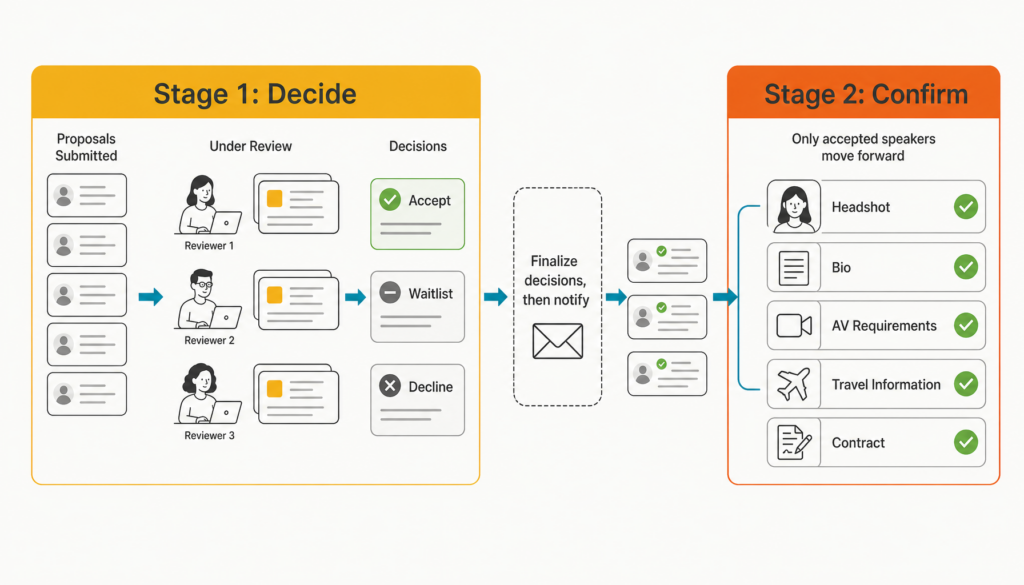
Decisions, notifications, and logistics blur together when nothing separates them. Some speakers hear “yes” before the program is final. Others get travel questions before anyone has read their abstract.
Splitting the process into two stages gives each job its own time and owner:
| Stage 1: Decide | Stage 2: Confirm | |
| Purpose | Choose sessions | Prepare accepted speakers |
| Who uses it | Reviewers | Program and logistics team |
| When | While submissions are open | After decision emails go out |
| What you collect | The fields in “What to Ask” | The details in “What to Save” |
EventMobi’s user research shows what skipping stages costs. At one annual event with about 200 proposals, speakers registered as attendees, and the team then exported and retyped their data. Every accepted speaker’s details passed through a spreadsheet by hand.
Now picture a teachers’ professional development conference of the same size that uses stages. Stage 1 feeds review and nothing else. Stage 2 starts only for accepted speakers, so nobody retypes data from proposals that never make the program.
Smaller teams benefit too. Picture a nonprofit summit with 30 proposals and a team of two. Stage 1 lets them choose sessions in one sitting, and Stage 2 keeps logistics out of their inbox until the lineup is set.
One rule holds the framework together: finalize every decision before you notify anyone. Late proposals sometimes outshine early favorites. If no emails have gone out, you can reverse an early “yes” without an awkward retraction.
That’s why status changes and notifications should stay separate. In EventMobi, changing a status doesn’t send an email; decision emails go out only when you trigger them. Once the program is set, you can send them in bulk and see which submissions have been notified.
Speaker Application Form Checklist Before You Launch
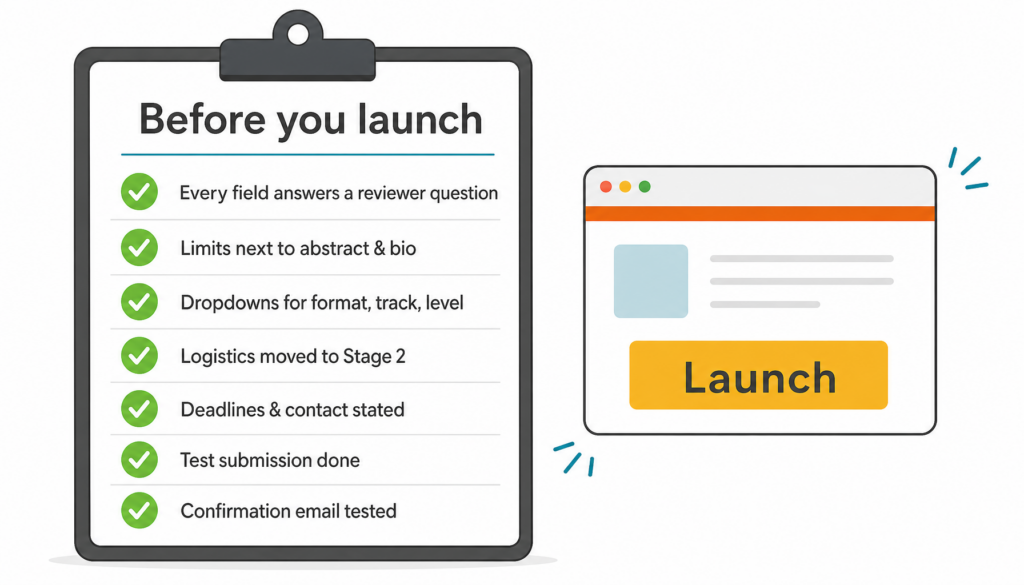
Small form mistakes tend to surface after 50 proposals have arrived. By then, fixing a missing field or a confusing instruction means emailing every speaker who already submitted. A short review before launch prevents that.
Work through this list before you share the link:
- Every field answers a reviewer question
- Word or character limits sit next to the abstract and bio fields
- Dropdowns cover format, track, and audience level
- Logistics fields are removed and listed for Stage 2
- The call page states deadlines, notification dates, and a contact
- A trusted speaker has test-submitted the form
- The confirmation email has been tested and reads clearly
Why bother with a test submission? It catches what you’re too close to see, like an unclear prompt, a dropdown missing a format, or a limit that cuts off an abstract. Ask your tester how long it took and where they hesitated.
Then put each remaining field to four questions. Will a reviewer use this answer, and could you collect it after acceptance instead? Would you fill it out yourself for a 45-minute session, and who on your team will review it?
Picture a corporate internal conference with 15 employee proposals from across departments. Even at that size, asking for travel and AV needs up front invites questions the team isn’t ready to answer. The checklist works at any volume.
Review deserves the same planning as the form. EventMobi’s review workspace keeps every proposal, status, submission date, and timestamped note in one table. What your checklist sets up carries straight into review, with no separate tracking sheet.
Speaker Application Form FAQ
These frequently asked questions (FAQ) cover what to include, how long the form should be, headshots, and how a call for speakers compares to a speaker application or call for papers.
The Bottom Line on Speaker Application Forms
A good speaker application form asks only what reviewers need to decide. Everything else waits until after acceptance, on a schedule you set. That split gives strong proposals a fair shot at the stage and spares your team the last-minute chase.
Reviewers get to judge sessions on substance, and your logistics team works from current details.
Your next step is concrete: before your next call for speakers opens, go through your current form. Move every logistics field to a Stage 2 list, and send that list only to the speakers you accept.

EventMobi helps you collect short proposals, compare them in one review workspace, and send acceptance and rejection emails once every decision is final. A demo walks you through each step live.
